
Secret Santa email templates for employees
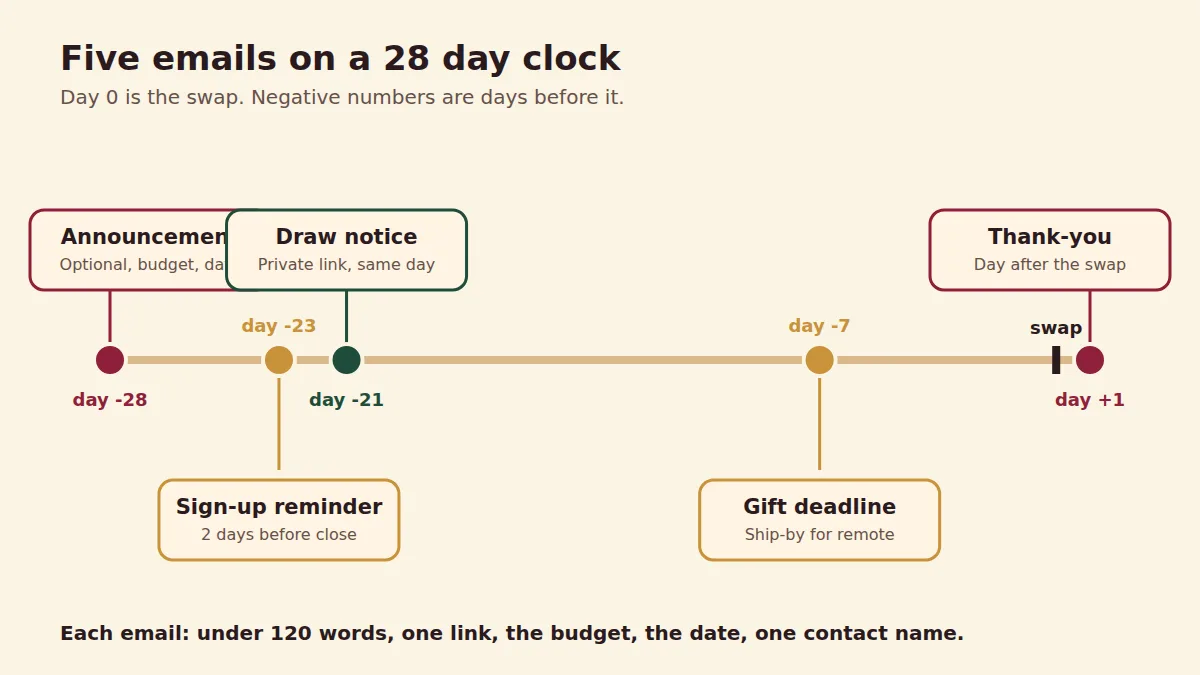
Send five emails: an announcement, a sign-up reminder, the draw notice, a gift deadline reminder and a thank-you. Copy each below, replace the brackets, and send from HR or the organizer. Each email is short and states the budget, date and where to ask questions.
What each email does and when to send it
| Send | Purpose | |
|---|---|---|
| Announcement | 4 weeks before the swap | Explain, set budget, open sign-up |
| Sign-up reminder | 2 days before sign-up closes | Catch people who missed it |
| Draw notice | Right after the draw | Tell people to open their link |
| Gift deadline | 1 week before the swap | Remind about date and budget |
| Thank-you | Day after the swap | Close it and invite feedback |
Before you write the emails
Decide the rules first with office Secret Santa rules, then paste the facts into each email. If your company wants a written policy, adapt the HR policy template. Remote staff also need the ship-by date: see hybrid teams.
Tips for the subject line and body
- Put the action and the date in the subject: "Secret Santa sign-up closes Friday".
- State in line one that it is optional.
- Give one link, not several.
- Keep it under 120 words.
- Do not use a reply-all list. Use BCC or an alias.
What to leave out of the message
- Pressure. CalChamber advises keeping participation optional because not everyone wants to join or can afford to. Do not name people who have not signed up, and do not send a reminder to staff who have already said no.
- Gift suggestions based on a person's role or background. CalChamber describes Secret Santa as full of stereotypes. Point givers to the wishlist and questionnaire instead.
- Anything that sounds like a company rule. MLT Aikins recommends stating that opting out will not affect anyone's standing, so say it in plain words.
- Open-ended jokes about gifts. MLT Aikins notes that conduct and respectful-workplace policies still apply to holiday activities, so give one named contact for concerns.
Sending the private link
With Hollyhush, the organizer creates the group, shares one invite link, and each person types a name to join. The draw gives every person a private link. The organizer can paste each link into a message or chat. There is no account and no app. If you have a long list of staff and want the links emailed for you, the optional Office plan does that, up to 300 people, and the free version covers up to 50. See Secret Santa without email.
Add the budget, the swap date and one contact name to every email. The Office plan ($39 once per event) emails each person their link for you.
Create the group and get the invite link to paste into your email. Create your group, free
Five emails to copy
Replace the text in brackets.
Subject: Optional Secret Santa, sign up by [date] Hi team, We are running an optional Secret Santa this year. Each person draws one name and buys one gift. Budget: $[25]. Swap: [date] at [time and place]. Sign up here by [date]: [invite link] Joining is entirely voluntary. Questions to [name]. [Your name]
Subject: Secret Santa sign-up closes [day] A quick reminder that sign-up closes on [day]. Join here: [invite link]. It takes ten seconds and needs no account. If you would prefer not to take part, no action needed. [Your name]
Subject: Your Secret Santa name is ready The draw is done. Open your private link to see who you have and add your wishlist: [personal link]. Budget is $[25]. Please keep your match secret until [date]. [Your name]
Subject: Secret Santa gifts due [date] Reminder: gifts are due by [date] at [place], or order by [ship-by date] if you are remote. Budget is $[25]. If you have trouble, tell [name] and we will help. [Your name]
Subject: Thank you for joining Secret Santa Thank you to everyone who took part. We hope you enjoyed it. If you have feedback for next year, send it to [name]. Happy holidays. [Your name]
Frequently asked questions
What do I write in a Secret Santa email to employees?
State that it is optional, the budget, the swap date, how to sign up and who to contact. Keep it short.
How do I send Secret Santa links by email?
Paste the invite link in a group email, and send each person's private link in their own message. The Office plan can email them for you.
When should I send the first email?
Four weeks before the swap.
Should I use reply-all?
No. Use BCC or a distribution list so replies go to you only.
Can I use these templates for a team chat?
Yes. Shorten them for Slack or Teams.
Try it now
A draw takes about a minute. No signup, no email, a private link for everyone.
Create your group, free- Couples & exclusions
- Wishlists & anonymous questions
- Deletes itself in 60 days
Ready when you are
Make a draw in a minute. No signup, no email, private links for everyone.