Amazon wish list alternative for Christmas
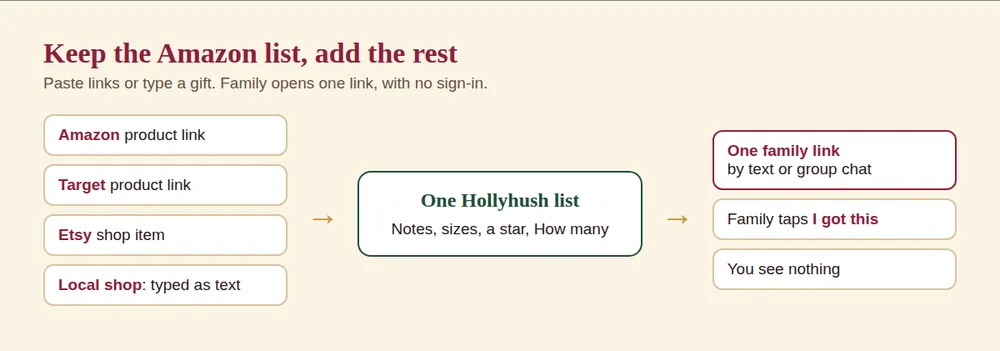
An Amazon wish list works well if every gift comes from Amazon and everyone in your family has an Amazon account. If your list includes other stores, or relatives do not want to sign in, Hollyhush is a free alternative that takes a link from any store and needs no account. You can also keep your Amazon list and paste its links into one shareable page.
When an Amazon wish list is the right choice
- Everything you want is on Amazon.
- Your family already shops there and has accounts.
- You want the fast checkout and returns Amazon gives.
Where a different list helps
- Other stores. Target, Walmart, Etsy, Best Buy, a local shop. A store list does not hold them all.
- No account. A relative should not need to sign in to see your list.
- Surprise. Amazon's help page says you can stop purchased items from appearing to you, but only by changing a setting. On Hollyhush the owner never sees them.
- Family board. One page for several people's lists.
Amazon changes its wish list features, so check the current settings for sharing and purchases. Its help page says shoppers "will always see what has been purchased."
Side by side
| Amazon wish list | Hollyhush list | |
|---|---|---|
| Stores | Amazon, plus other stores through add-ons in some cases | Any store with a product link, or type a gift |
| Account for you | Amazon account | None |
| Account for the family | Amazon help does not say; test a link in a private window | None to view or mark |
| Owner sees purchases | Only if the setting is on | No |
| Mark as bought | Via purchase | I got this button, also for gifts bought elsewhere |
| Cost | Free | Free |
| Deletes | You manage it | Automatically after January 31 |
What to check in any list app
- Can relatives open it without an account?
- Does it include gifts from other stores?
- Can buyers mark an item as taken, including items bought elsewhere?
- Does the owner see what was bought, and can you turn it off?
- Does it show on a phone without an app download?
- What happens to the list after the holidays, and can you delete it?
Using both
You can keep an Amazon list and use Hollyhush for the rest. Paste the Amazon link into Hollyhush and add the rest, as in the picture above. Buy links to Amazon and other stores may earn Hollyhush a small commission at no extra cost to the buyer. The FTC says a site should state a link relationship like that clearly and near the link, and that a bare "Buy now" button is not an adequate disclosure, so we say it in plain words on the page.
Start with the Christmas wish list app or build a quick one in the template. For how Hollyhush hides claims see a gift list that hides what's bought.
Make a list from any store, free. Start my Christmas list
Frequently asked questions
What is a good alternative to an Amazon wish list?
A list that accepts links from any store and does not require accounts, such as Hollyhush.
Can I add non-Amazon items to a list?
On Hollyhush, yes, paste any product link or type the item.
Does the owner see what was bought on an Amazon list?
Only if the setting is on. Amazon's help says that if you turn the setting off, purchased items will not appear to you.
Can I import my Amazon list?
Paste links one by one. Hollyhush reads the product name, picture and price when the store allows it.
Is Hollyhush free?
Yes. Store links may earn a small commission at no cost to the buyer.
Make your list
Add what you want, send one link. Family marks what they bought and you never see it.
Start my Christmas list- No account, no app, no email
- Works with any store link
- Deletes itself after January 31
Ready when you are
Make a list in a minute. No sign-up, no name, no email, and you never see what was bought.